Editor
ランタイム統合型エディタのビジュアルデザインと構造
Editor Overview
Hybrid ECSのエディタは独立したアプリケーションではなく、Runtimeに統合されたインタラクティブUIとして動作します。 これにより、ゲーム実行中でもEntity・Component・Systemをリアルタイムに編集・反映できます。
ImGuiをベースとした即時モードUIを採用し、軽量かつ高応答なエディタ操作を実現しています。
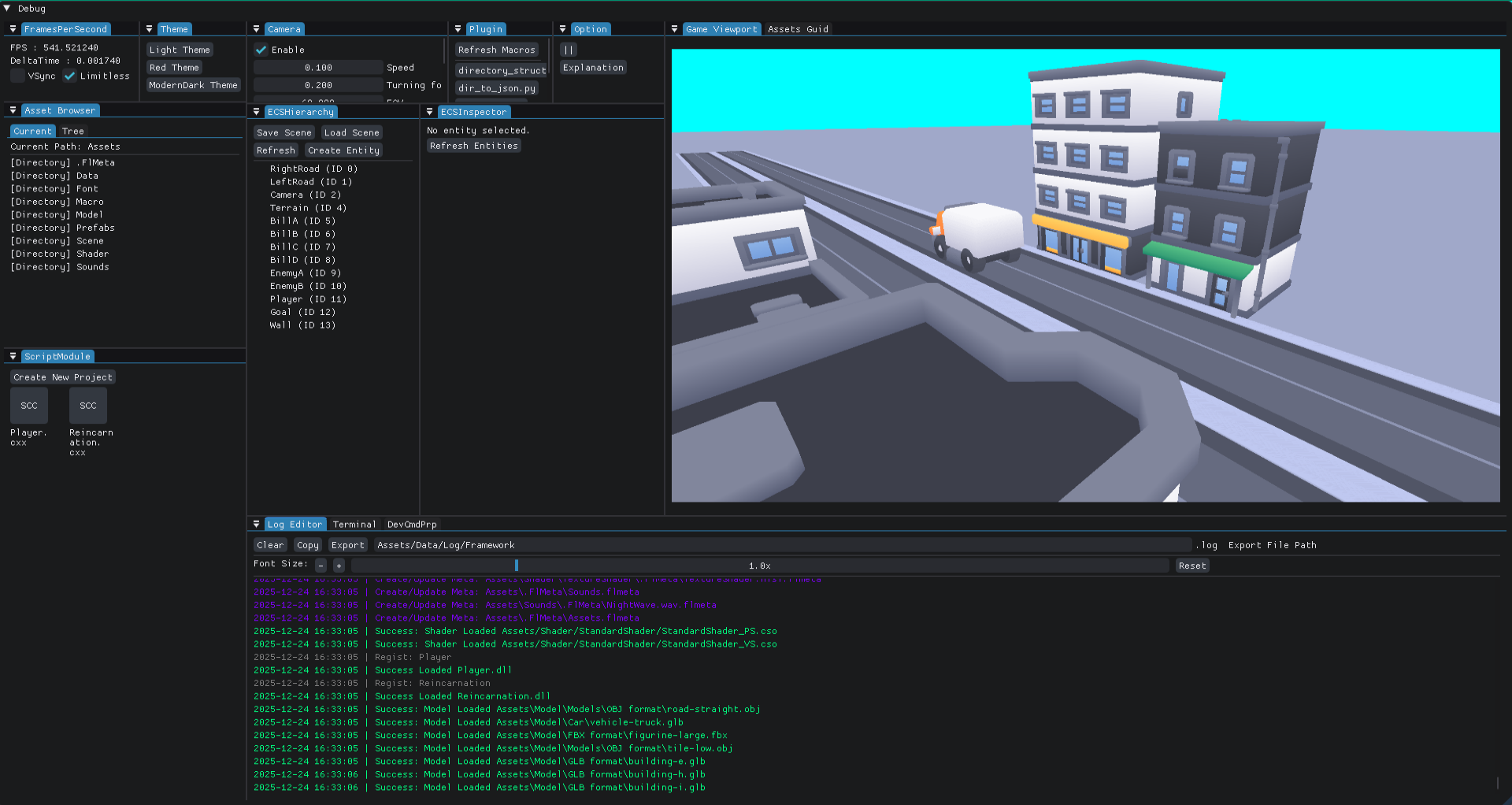
Editor Windows
各ウィンドウは独立したモジュールとして構築され、エンジン内部のデータと双方向に通信します。 UIは統一されたテーマとアニメーションで構成され、操作感の一貫性を重視しています。
🎮 GameViewWindow
実際のゲーム画面をプレビュー。エディタのサイズ変更に追従しつつ、 固定アスペクト比を維持します。 Scene Viewと同期しており、プレイヤー視点やカメラ切替をリアルタイムで反映可能です。
// --- 抜粋: Game Viewport Window ---
{
    ...

    auto windowContentSize      { ImGui::GetContentRegionAvail() };
    auto gameScreenOriginalSize { ImVec2{ static_cast<float>m_windowW, static_cast<float>m_windowH } };
    auto aspectRatio            { gameScreenOriginalSize.x / gameScreenOriginalSize.y };
    auto scaledWidth            { windowContentSize.x };
    auto scaledHeight           { scaledWidth / aspectRatio };

    if (scaledHeight > windowContentSize.y)
    {
        scaledHeight = windowContentSize.y;
        scaledWidth  = scaledHeight * aspectRatio;
    }

    auto offset { ImVec2{
        (windowContentSize.x - scaledWidth)  * Def::Half,
        (windowContentSize.y - scaledHeight) * Def::Half
    } };

    ImGui::SetCursorPos(ImGui::GetCursorPos() + offset);
    ImGui::Image(texId, ImVec2{ scaledWidth, scaledHeight });
}
📐 技術的ポイント
- ウィンドウのリサイズに応じて動的にスケーリングを行い、アスペクト比を厳密に保持。
ImGui::GetContentRegionAvail()とImGui::SetCursorPos()を用いて、中心補正による美しいレイアウトを実現。
📦 AssetsWindow
アセットブラウザ。Tree表示とCurrent表示の2モードを搭載。 ドラッグ&ドロップ、右クリックメニュー、外部ファイルの取り込みにも対応。 拡張子に応じたプレビューアイコンを自動表示します。
// --- 抜粋: FlFileEditor::ShowAssetBrowser ---
if (ImGui::Begin(title.c_str(), p_open, flags))
{
    if (ImGui::BeginTabBar("ControlTabs"))
    {
        if (ImGui::BeginTabItem("Current"))
        {
            RenderCurrentItem();
            ImGui::EndTabItem();
        }

        if (ImGui::BeginTabItem("Tree"))
        {
            FileEntry root{};
            BuildFileTree(m_basePath, root);
            RenderFileEntry(root);
            ImGui::EndTabItem();
        }
        ImGui::EndTabBar();
    }

    // 外部ファイルドロップ受付
    if (!m_doppedPath.empty())
    {
        auto entryPath{ m_currentPath };

        auto dst{ entryPath / m_doppedPath.filename() };
        if (std::filesystem::exists(dst))
        {
            auto count{ Def::IntZero };
            auto stem{ dst.stem().string() };
            auto ext{ dst.extension().string() };
            do {
                dst = entryPath / (stem + "_copy" + std::to_string(++count) + ext);
            } while (std::filesystem::exists(dst));
        }

        // ログ出力
        if (m_fileWatcher.Copy(m_doppedPath, dst))
        {
            auto dopp{ m_upFPM->GetRelative(m_doppedPath) };
            FlEditorAdministrator::Instance().GetLogger()->AddChangeLog("Dropped External File: %s to %s", dopp.string().c_str(), dst.string().c_str());
        }
        else
        {
            auto dopp{ m_upFPM->GetRelative(m_doppedPath) };
            FlEditorAdministrator::Instance().GetLogger()->AddErrorLog("Error: Dropped External File: %s to %s", dopp.string().c_str(), dst.string().c_str());
        }

        m_doppedPath.clear();
    }

    RenderPopup();
}
ImGui::End();
🧭 技術的ポイント
std::filesystemを用いて動的にディレクトリツリーを構築し、ファイル構造の変更を即時反映。- 外部ファイルのドラッグ&ドロップ (D&D) を検知し、同名衝突時には 自動で "_copy[n]" 連番処理を行う安全設計。
- ImGuiのポップアップメニュー (右クリック) を活用して、エクスプローラ連携・クリエイト・リネーム・コピー (GUIDもしくはパス) ・ペースト・削除などをワンクリックで操作可能。
// --- 抜粋: FlFileEditor::RenderFileEntry ---
if (ImGui::BeginPopupContextItem())
{
    if (ImGui::MenuItem("Open"))
    {
        ShellExecuteW(nullptr, L"open", L"explorer.exe", entry.path.wstring().c_str(), nullptr, SW_SHOWNORMAL);

        // ログ出力
        FlEditorAdministrator::Instance().GetLogger()->AddLog("Open %s",
            entry.path.string().c_str());
    }

    ...

    if (ImGui::MenuItem("Copy Guid"))
    {
        auto guid { FlResourceAdministrator::Instance()
                        .GetMetaFileManager()->FindGuidByAsset(entry.path) };
        if (!guid.has_value())
            // ログ出力
            FlEditorAdministrator::Instance().GetLogger()->AddErrorLog("Failed Copy Guid by %s",
                entry.path.string().c_str());
        else
        {
            ImGui::SetClipboardText(guid.value().c_str());

            // ログ出力
            FlEditorAdministrator::Instance().GetLogger()->AddLog("Copy Guid by %s",
                entry.path.string().c_str());
        }
    }

    ...

    if (ImGui::MenuItem("Delete"))
        m_pendingPopup = PopupRequest{ entry.path, PopupRequest::Type::Delete };
    ImGui::EndPopup();
}
📂 技術的ポイント
-
右クリックメニューはImGuiの
BeginPopupContextItem()を利用して即時生成し、コード量を分割化。
そして、警告文やキャンセルなどの選択肢を出し誤操作を回避します。 - 各ファイル・ディレクトリに対し、GUIDメタ情報を関連付けて一貫したアセット管理を実現。
- メタファイル追従 (リネーム・移動検知) は
FlResourceAdministrator経由で処理され、GUID再発行を防止。
📘 ListingViewer
GUIDとアセットパスの対応関係を一覧化するツール。 Filter検索で瞬時に目的のアセットを特定でき、 表示モード切替により GUID / Assets / 両方 のビューを自在に切り替え可能。 MetaFileManagerの内部マップをリアルタイムに反映します。
// --- 抜粋: FlListingEditor::RenderListingViewer ---
ImGui::Begin(title.c_str(), p_open, flags);

m_filter.Draw("Filter (type to search)", 200.0f);
ImGui::SameLine();
if (ImGui::Button("Option")) m_isOption = !m_isOption;
ImGui::Separator();

if (m_isOption)
{
    bool checked1{ (m_listingTypes & GuidAndAssets) == GuidAndAssets };
    if (ImGui::Checkbox("GuidAndAssets", &checked1))
    {
        if (checked1) m_listingTypes |= GuidAndAssets;
        else m_listingTypes &= ~GuidAndAssets;
    }
    bool checked2{ (m_listingTypes & Guid) != None };
    if (ImGui::Checkbox("Guid Only", &checked2))
    {
        if (checked2) m_listingTypes |= Guid;
        else m_listingTypes &= ~Guid;
    }
    bool checked3{ (m_listingTypes & Assets) != None };
    if (ImGui::Checkbox("Assets Only", &checked3))
    {
        if (checked3) m_listingTypes |= Assets;
        else m_listingTypes &= ~Assets;
    }
}
else
{
    ListingGuidAssets(
        (m_listingTypes & GuidAndAssets),
        (m_listingTypes & Guid),
        (m_listingTypes & Assets)
    );
}

ImGui::End();
// --- 抜粋: FlListingEditor::ListingGuidAssets ---
if (isAssetsAndGuid)
{
    if (ImGui::BeginTable("MapTable", 2,
        ImGuiTableFlags_Borders | ImGuiTableFlags_RowBg | ImGuiTableFlags_Resizable))
    {
        ImGui::TableSetupColumn("Key");
        ImGui::TableSetupColumn("Value");
        ImGui::TableHeadersRow();

        for (const auto& [key, value] : guidMap)
        {
            std::string combined = key + " " + value;
            if (!m_filter.PassFilter(combined.c_str())) continue;

            ImGui::TableNextRow();
            ImGui::TableSetColumnIndex(0);
            ImGui::TextUnformatted(key.c_str());
            ImGui::TableSetColumnIndex(1);
            ImGui::TextUnformatted(value.c_str());
        }
        ImGui::EndTable();
    }
}
📘 技術的ポイント
-
MetaFileManager 内のGUIDマップを直接参照し、
std::unordered_map<std::string, std::string>形式で即時描画。 更新があれば即座に反映されるリアルタイム設計。 -
ImGui::BeginTable() による高可読なテーブルUI。
ImGuiTableFlags_Borders | RowBg | Resizableを使用し、 大量データでも見やすく、列サイズ調整も可能。 -
モード切替設計:
GUID/Asset/両方の表示を
BitFlagで制御。GuidAndAssets・Guid・Assetsの3状態を チェックボックスで直感的にトグル操作。 -
柔軟なフィルタ条件ロジック:
複合条件(GUID+Asset)検索にも対応するよう、
行結合文字列
key + " " + valueで全文検索を実現。 - Option UI はトグル可能。 非表示時はコンパクトなリストビューとして機能し、 表示時はフィルタ設定やリストタイプ選択が可能な拡張モードに。
📜 ScriptModuleEditor
C++スクリプトモジュールの作成・削除をGUI上で行うエディタ。
FlVisualStudioManagerを利用して、
.vcxproj および .filters ファイルを自動生成し、
.sinに追加します。
// --- 抜粋: FlScriptModuleEditor::Render ---
if (ImGui::Begin(title.c_str(), p_open, flags))
{
    if (ImGui::Button("Create New Project"))
    {
        m_pendingPopup = PopupRequest{ PopupRequest::Type::Create };
    }

    for (auto& path : m_codeFiles)
    {
        ImGui::PushID(id++);

        auto isChanged = m_meta->IsAssetChanged(path);

        auto filename = std::filesystem::path(path).filename().string();
        auto folder = std::filesystem::path(path).parent_path().filename().string();
        const char* icon = "?";
        auto ext = Str::FileExtensionSearcher(path);
        if (ext == "cxx") icon = "SCC";

        if (ImGui::BeginPopupContextItem("ProjectContext"))
        {
            if (ImGui::MenuItem("Delete Project"))
            {
                // プロジェクト名(フォルダ名)を保存
                m_pendingPopup = PopupRequest{ PopupRequest::Type::Delete, folder };
            }
            ImGui::EndPopup();
        }

        ImGui::Button(icon, iconSize);

        if (ImGui::IsItemHovered() && ImGui::IsMouseDoubleClicked(ImGuiMouseButton_Left))
            ShellExecuteW(nullptr, L"open", ansi_to_wide(path).c_str(), nullptr, nullptr, SW_SHOWNORMAL);

        if (ImGui::IsItemHovered() && ImGui::IsMouseClicked(ImGuiMouseButton_Right))
            ImGui::OpenPopup("ProjectContext");

        ImGui::TextWrapped("%s", filename.c_str());
        ImGui::NextColumn();
        ImGui::PopID();
    }

    RenderPopup();
}
ImGui::End();
// --- 抜粋: FlScriptModuleEditor::RenderPopup ---
// --- Create Popup ---
if (m_pendingPopup->type == PopupRequest::Type::Create)
    ImGui::OpenPopup("CreateVSPopup");

// --- Delete Popup ---
if (m_pendingPopup->type == PopupRequest::Type::Delete)
    ImGui::OpenPopup("DeleteProjectPopup");

// ▼ Create ポップアップ(既存)
if (ImGui::BeginPopup("CreateVSPopup"))
{
    ImGui::InputText("Project Name", &m_newProjectName);

    if (ImGui::Button("Create") && !m_newProjectName.empty())
    {
        auto ok{ m_manager->CreateNewProject(
            m_newProjectName,
            m_targetDir
        ) };

        if (ok)
        {
            FlEditorAdministrator::Instance().GetLogger()->AddSuccessLog(
                "Created new project: %s", m_newProjectName.c_str());
            m_codeFiles = m_meta->GetAllFilePaths();
            ChangedFilesRefresh();
        }
        else
        {
            FlEditorAdministrator::Instance().GetLogger()->AddErrorLog(
                "Failed to create project: %s", m_newProjectName.c_str());
        }

        m_newProjectName.clear();
        m_pendingPopup.reset();
        ImGui::CloseCurrentPopup();
    }

    ImGui::EndPopup();
}

// ▼ Delete ポップアップ
if (ImGui::BeginPopup("DeleteProjectPopup"))
{
    auto& projName = m_pendingPopup->targetProjectName;

    ImGui::Text("Delete project \"%s\" ?", projName.c_str());
    ImGui::Separator();

    if (ImGui::Button("Delete"))
    {
        FlEntityComponentSystemKernel::Instance().ClearComponent(std::filesystem::path(projName).stem().string());

        m_manager->RemoveProjectFromSolution((m_targetDir / projName / (projName + ".vcxproj")).lexically_normal());

        upFile->RemDirectory(dllPath);
        upFile->RemDirectory(dir);

        FlEditorAdministrator::Instance().GetLogger()->AddSuccessLog(
            "Deleted project: %s", projName.c_str());

        m_codeFiles = m_meta->GetAllFilePaths();

        m_pendingPopup.reset();
        ImGui::CloseCurrentPopup();
    }

    ImGui::EndPopup();
}
📜 技術的ポイント
-
XMLパーサと自動追加システム:
FlSimpleCppParserクラスが、 .cxxファイルを解析し、 tinyXml2を利用したFlAutomaticFileAddSystemクラスを介して、 自動作成された.c++ファイルと.hhをプロジェクトに追加します。 -
ファイル監視と自動更新:
FlFileWatcherによりScriptModuleディレクトリを監視。 .cxxファイル変更を検知すれば即座に.c++ファイルと.hhを更新し、ビルドを行います。
🧩 Hierarchy
シーン内のEntityを階層表示。 D&Dで親子関係を変更が可能。 Sceneの保存・読込ボタンで、即座にJSONファイルへの保存・読込を行います。 右クリックメニューからPrefabの作成やインスタンス化が可能です。
// --- 抜粋: FlECSInspectorAndHierarchy::RenderHierarchyWindow ---
if (ImGui::Button("Save Scene"))
{
    std::string filepath{ "Assets/Scene/" };
    if (SaveFileDialog(filepath, "Save Scene", "Scene Files (*.flscene)\0*.flscene\0All Files (*.*)\0*.*\0", "flscene"))
        FlJsonUtility::Serialize(FlEntityComponentSystemKernel::Instance().SerializeScene(), filepath);
}
ImGui::SameLine();
if (ImGui::Button("Load Scene"))
{
    std::string filepath{ "Assets/Scene/" };
    if (OpenFileDialog(filepath, "Load Scene", "Scene Files (*.flscene)\0*.flscene\0All Files (*.*)\0*.*\0"))
    {
        auto j{ nlohmann::json{} };
        if (FlJsonUtility::Deserialize(j, filepath))
        {
            FlEntityComponentSystemKernel::Instance().DeserializeScene(j);
            RefreshEntityList();
        }
        else
            FlEditorAdministrator::Instance().GetLogger()->AddWarningLog("Failed load scene %s", filepath.c_str());
    }
}

if (ImGui::Button("Refresh"))
    RefreshEntityList();

ImGui::SameLine();
if (ImGui::Button("Create Entity"))
{
    auto newID{ FlEntityComponentSystemKernel::Instance().CreateEntity() };
    FlEntityComponentSystemKernel::Instance().AddComponent("Name", newID);
    FlEntityComponentSystemKernel::Instance().AddComponent("Transform", newID);
    RefreshEntityList();
}

ImGui::Separator();

// ---- ROOT ノードだけ描画 ----
for (auto rootId : GetRootEntities())
    RenderEntityNode(rootId);

ImGui::End();
// --- 抜粋: FlECSInspectorAndHierarchy::RenderEntityNode ---
auto& kernel = FlEntityComponentSystemKernel::Instance();

bool selected = (m_selectedEntityId == id);

ImGuiTreeNodeFlags flags = ImGuiTreeNodeFlags_OpenOnArrow |
    ImGuiTreeNodeFlags_OpenOnDoubleClick |
    (selected ? ImGuiTreeNodeFlags_Selected : 0);

// ---- Drop Target ----
if (ImGui::BeginDragDropTarget())
{
    if (auto payload = ImGui::AcceptDragDropPayload("ENTITY_ID"))
    {
        uint32_t childId = *(uint32_t*)payload->Data;
        if (childId != id)
            SetParent(childId, id);
    }
    ImGui::EndDragDropTarget();
}

// ---- Right Click Context Menu ----
if (ImGui::BeginPopupContextItem())
{
  if (ImGui::MenuItem("Delete Entity"))
  {
      DeleteEntityRecursive(id);
      ImGui::EndPopup();
      if (open) ImGui::TreePop();
      return;
  }
  if (ImGui::MenuItem("Termination of Parent"))
      SetParent(id, UINT32_MAX);
	if (ImGui::MenuItem("Create Prefab"))
		CreatePrefab(id);
	if (ImGui::MenuItem("Instantiate Prefab"))
	{
		std::string path{ "Assets/Prefabs/" };
		if (OpenFileDialog(path, "Load Prefab", "Prefab (*.flprefab)\0*.flprefab\0"))
			InstantiatePrefab(path);
	}
    ImGui::EndPopup();
}

if (open)
{
    if (tc)
    {
        for (auto child : tc->m_children)
            RenderEntityNode(child);
    }
    ImGui::TreePop();
}
🌳 技術的ポイント
- ルートEntityを起点に、再帰的に子Entityをツリー構造として描画。
- Scene・Prefab保存/読込はファイルダイアログを通じて即時反映。
⚙️ InspectorWindow
選択されたEntityの情報とComponentを一覧表示。
追加・削除、各Componentの RenderEditor() によるUI描画もここで行われます。
何も選択していない場合は「No entity selected.」を表示します。
// --- 抜粋: FlECSInspectorAndHierarchy::RenderInspectorWindow ---
if (!ImGui::Begin(title, p_open))
{
    ImGui::End();
    return;
}

if (m_selectedEntityId == UINT32_MAX) {
    ImGui::TextUnformatted("No entity selected.");
    if (ImGui::Button("Refresh Entities")) RefreshEntityList();
    ImGui::End();
    return;
}

for (const auto& typeName : compTypes)
{
    // Collapsing header per component type
    if (ImGui::CollapsingHeader(typeName.c_str()))
    {
        bool rendered = FlEntityComponentSystemKernel::Instance().RenderComponentEditor(typeName, id);
        if (!rendered)
            ImGui::TextDisabled("No editor for this component (or missing reflection).");

        if (typeName == "Transform") continue;
        if (ImGui::Button((std::string("Remove##") + typeName).c_str())) {
            FlEntityComponentSystemKernel::Instance().RemoveComponent(typeName, id);
            FlEditorAdministrator::Instance().GetLogger()->AddLog("Removed component %s from %u", typeName.c_str(), id);
            compTypes = FlEntityComponentSystemKernel::Instance().GetEntityComponentTypes(id);
        }
    }
}

ImGui::Separator();
ImGui::Text("Add Component");

// すべての登録コンポーネント名を取得
const auto& allTypes = FlEntityComponentSystemKernel::Instance().GetRegisteredComponentTypes();

// 既にアタッチ済みのものは除外
std::vector<const char*> attachableTypes;
attachableTypes.reserve(allTypes.size());

for (const auto& typeName : allTypes)
{
    bool alreadyAttached = false;
    for (const auto& existingComp : FlEntityComponentSystemKernel::Instance().GetEntityComponentTypes(id))
    {
        if (existingComp == typeName)
        {
            alreadyAttached = true;
            break;
        }
    }
    if (!alreadyAttached)
        attachableTypes.push_back(typeName.c_str());
}

// attachableTypes が空なら何も追加できない
if (attachableTypes.empty())
    ImGui::Text("No components available to attach.");
else
{
    static int selectedIndex = 0;
    // インデックスが範囲外にならないよう調整
    if (selectedIndex >= attachableTypes.size())
        selectedIndex = 0;

    const char* preview = attachableTypes[selectedIndex];

    if (ImGui::BeginCombo("##ComponentTypes", preview))
    {
        for (int i = 0; i < attachableTypes.size(); ++i) {
            bool selected = (selectedIndex == i);

            if (ImGui::Selectable(attachableTypes[i], selected))
                selectedIndex = i;

            if (selected)
                ImGui::SetItemDefaultFocus();
        }
        ImGui::EndCombo();
    }

    ImGui::SameLine();

    // ▼ Attach ボタン
    if (ImGui::Button("Attach"))
    {
        try {
            FlEntityComponentSystemKernel::Instance().AddComponent(attachableTypes[selectedIndex], id);
        }
        catch (...) {
        }
    }
}

ImGui::End();
🧠 技術的ポイント
-
FlEntityComponentSystemKernelを通じて登録済みのコンポーネント型一覧を取得し、 アタッチ可能な種類をリアルタイムで抽出するコンボボックスを実装。 -
Componentの
RenderImGui()を通じて、ランタイム組み込みエディタとして 同一コードベース内で動的編集を可能に。
🧮 FrameRateWindow
FPS・デルタタイム表示に加え、VSyncやLimitlessモード切替、 フレームレート上限を設定するスライダーを提供します。 パフォーマンスモニタとしても利用可能。
// --- 抜粋: FrameRateWindow ---
if (ImGui::Begin("FramesPerSecond"))
{
    if (auto spFrameRateController{ m_wpFrameRateController.lock() })
    {
        ImGui::Text("FPS : %f", spFrameRateController->GetCurrentFPS());
        ImGui::Text("DeltaTime : %f", spFrameRateController->GetDeltaTime());

        // VSync トグル
        if (ImGui::Checkbox("VSync", &spFrameRateController->WorkIsVsync()))
        {
            spFrameRateController->SetIsVsync(spFrameRateController->GetIsVsync());
            m_upLogEditor->AddLog("VSync: %s",
                spFrameRateController->GetIsVsync() ? "Enabled" : "Disabled");
        }

        ImGui::SameLine();

        // Limitless トグル
        if (ImGui::Checkbox("Limitless", &spFrameRateController->WorkIsLimitless()))
        {
            spFrameRateController->SetIsLimitless(spFrameRateController->GetIsLimitless());
            m_upLogEditor->AddLog("Limitless: %s",
                spFrameRateController->GetIsLimitless() ? "Enabled" : "Disabled");
        }

        // ターゲットFPS設定
        if (!spFrameRateController->GetIsLimitless())
        {
            ImGui::SliderInt("TargetFrameRate", &m_targetFrameRate, 30, 300);
            spFrameRateController->SetDesiredFPS(static_cast<float>(m_targetFrameRate));
        }
    }
}
ImGui::End();
⏱ 技術的ポイント
- Limitlessモード切替により、ターゲットFPS制御を動的に解除・再設定可能。 シミュレーション/エディタ動作モードをシームレスに切替。
-
スライダー値は
SetDesiredFPS()を介して エンジン全体の タイムステップ挙動 に直接反映。 開発中でもリアルタイムに最適フレーム制御をテスト可能。
🎨 ThemeWindow
エディタ全体のテーマを変更。 トランジションはイージングを用いて自然に切り替わります。 ライト/ダークなどのテーマを即時反映。
// --- 抜粋: FlEditorCascadingStyleSheets::TransitionToTheme ---
void FlEditorCascadingStyleSheets::TransitionToTheme(const std::string& name, double durationSec, FlAnimator::EaseFunc ease)
{
    if (m_themes.find(name) == m_themes.end()) return;
    m_targetTheme = name;
    m_animator = FlAnimator(durationSec, ease);
    m_animator.start();

    // 遷移開始時の状態をキャプチャ
    m_startStyle = ImGui::GetStyle();
}
🎨 技術的ポイント
-
FlEditorCascadingStyleSheets クラスを中心に、
ImGuiのImGuiStyle構造体を直接制御することで UIテーマ全体の統一的なスタイル管理 を実現。 -
テーマ定義は
m_themesに保持され、 カラー (ImVec4)・パディング・ラウンディングなど すべてのスタイル要素を構造体として記録。 -
ApplyTheme()により即時切替、TransitionToTheme()により イージング関数付きのアニメーション遷移をサポート。 (内部ではFlAnimatorによる補間が進行) -
Update()関数では、各スタイル項目をlerp()で補間し、自然なフェード演出を実現。 特に色(RGBA)の補間はImGuiカラー配列全体に反映。 -
トランジション終了時に
m_currentThemeを更新し、 不整合を防止する堅牢な状態遷移設計。 遷移中は ImGui::GetStyle() が動的に変化。 - この仕組みにより、ライト/ダークテーマ切替だけでなく カスタムCSS的スタイル階層構造を実装可能。 UIデザインの一貫性と柔軟性を両立している。
🐍 PlugInWindow
特定フォルダ内のPythonスクリプトを自動検出。 各スクリプトに対応したボタンが生成され、クリックで実行可能。 出力は TerminalWindow に転送されます。
// --- 抜粋: FlPythonMacroEditor::ExecuteScript ---
std::string command = "python.exe \"" + std::filesystem::absolute(scriptPath).string() + "\"";
std::wstring wcommand = ansi_to_wide(command);

m_terminal.AddLog("> Executing: " + command);

if (!CreateProcess(nullptr, wcommand.data(), nullptr, nullptr, TRUE,
                   CREATE_NO_WINDOW, nullptr, nullptr, &si, &pi))
{
    m_terminal.AddLog("> Error: Failed to start python.exe.");
    return;
}

CloseHandle(hWrite);
char buffer[4096];
DWORD read = 0;
while (ReadFile(hRead, buffer, sizeof(buffer) - 1, &read, nullptr) && read > 0)
{
    buffer[read] = '\0';
    m_terminal.AddLog(buffer); // 出力をリアルタイム転送
}

WaitForSingleObject(pi.hProcess, INFINITE);
CloseHandle(pi.hProcess);
CloseHandle(pi.hThread);
CloseHandle(hRead);
m_terminal.AddLog("> Script finished: " + scriptPath.filename().string());
🐍 技術的ポイント
- FlPythonMacroEditor は ランタイム中にPythonスクリプトを検出・実行し、出力を即時にTerminalWindowへ転送します。
-
std::filesystemを利用して マクロフォルダを動的スキャンし、 拡張子.pyのみをUIボタンとして自動生成。 スクリプトを追加・削除しても 再起動不要で即反映。 -
実行プロセスは
CreateProcess()により生成され、 標準出力/標準エラーをCreatePipe()でリダイレクト。 非同期でPython出力を読み取り、リアルタイムにFlTerminalEditorへ流す仕組み。
💻 TerminalWindow
Hybrid ECSエディタに統合されたリアルタイム・コマンドライン環境。 ファイル操作・Git・Python・CMake・MSBuildなど、 あらゆる外部コマンドをエディタ内部から直接実行できます。 出力はすべてUTF-8整形され、リアルタイムにImGui上へストリーム表示されます。
// --- 抜粋: FlTerminalEditor::WorkerThread ---
while (m_running)
{
    std::string command;
    {
        std::unique_lock<std::mutex> lock(m_queueMutex);
        m_cv.wait(lock, [&] { return !m_running || !m_commandQueue.empty(); });
        if (!m_running) break;
        command = m_commandQueue.front();
        m_commandQueue.pop();
    }

    if (command.empty()) continue;

    // 内部コマンド処理 (cd, cls)
    if (command.rfind("cd ", 0) == 0)
    {
        std::string newDir = command.substr(3);
        auto newPath = m_currentDir / newDir;
        try {
            newPath = std::filesystem::canonical(newPath);
            if (std::filesystem::is_directory(newPath))
            {
                m_currentDir = newPath;
                AddLog("> Changed Current Directory: " + m_currentDir.string());
            }
            else AddLog("> Directory does not exist: " + newPath.string());
        }
        catch (const std::exception& e) {
            AddLog("> Directory change failed: " + std::string(e.what()));
        }
        continue;
    }

    // 外部プロセス実行 (例: git, python, cmake)
    SECURITY_ATTRIBUTES sa{ sizeof(SECURITY_ATTRIBUTES), nullptr, TRUE };
    HANDLE hRead = nullptr, hWrite = nullptr;
    CreatePipe(&hRead, &hWrite, &sa, 0);
    SetHandleInformation(hRead, HANDLE_FLAG_INHERIT, 0);

    STARTUPINFO si{ sizeof(STARTUPINFO) };
    PROCESS_INFORMATION pi{};
    si.dwFlags |= STARTF_USESTDHANDLES | STARTF_USESHOWWINDOW;
    si.hStdOutput = hWrite;
    si.hStdError  = hWrite;
    si.wShowWindow = SW_HIDE;

    auto fullCmd = "chcp 65001 > nul && cd /d \"" + m_currentDir.string() + "\" && " + command;
    auto wcmd = L"cmd.exe /c " + ansi_to_wide(fullCmd);

    if (!CreateProcess(nullptr, wcmd.data(), nullptr, nullptr, TRUE,
                       CREATE_NO_WINDOW, nullptr, nullptr, &si, &pi))
    {
        AddLog("> Failed to execute command: " + command);
        continue;
    }

    CloseHandle(hWrite);
    AddLog("> " + m_currentDir.string() + " " + command);

    // --- リアルタイム出力 ---
    char buffer[4096];
    DWORD bytesRead = 0;
    while (ReadFile(hRead, buffer, sizeof(buffer) - 1, &bytesRead, nullptr) && bytesRead > 0)
    {
        buffer[bytesRead] = '\0';
        AddLog(std::string(buffer, bytesRead));
    }

    WaitForSingleObject(pi.hProcess, INFINITE);
    CloseHandle(pi.hProcess);
    CloseHandle(pi.hThread);
    CloseHandle(hRead);
    m_scrollToBottom = true;
}
💡 技術的ポイント
-
マルチスレッド構成:メインスレッドは描画専用、
WorkerThread()はコマンド実行専用。 コマンド入力はstd::queueとstd::condition_variableによってスレッドセーフに非同期処理。 -
プロセス生成と出力リダイレクト:
CreatePipe()+CreateProcess()により、 標準出力/標準エラーをImGuiに転送。 外部ツール出力を リアルタイムストリームとして取得可能。 -
内部コマンド(例:
cd・cls)は 専用パスで直接実行し、外部プロセスを介さず高速反応。std::filesystem::canonical()によるパス解決で安全性も確保。
🧱 DeveloperCommandPrompt
Visual Studio Developer Command Prompt をエディタ内で利用可能。
msbuildコマンドで任意プロジェクトのBuild / Cleanを実行できます。
バッチファイル経由で自動設定を行うため環境変数も維持されます。
// --- 抜粋: FlDeveloperCommandPromptEditor::Render ---
if (ImGui::Begin(title.c_str(), p_open, flags))
{
    // プロジェクト選択コンボ
    if (ImGui::BeginCombo("Project",
        m_selectedProject >= 0 ? m_parser.GetProjects()[m_selectedProject].name.c_str() : "Select"))
    {
        for (int i = 0; i < m_parser.GetProjects().size(); i++) {
            bool selected = (m_selectedProject == i);
            if (ImGui::Selectable(m_parser.GetProjects()[i].name.c_str(), selected))
                m_selectedProject = i;
            if (selected) ImGui::SetItemDefaultFocus();
        }
        ImGui::EndCombo();
    }

    // 構成・プラットフォーム・アクション選択
    const char* configs[] = { "Debug", "Release" };
    const char* platforms[] = { "Win32", "x64" };
    const char* actions[] = { "Build", "Clean" };

    ImGui::Combo("Configuration", &m_selectedConfig, configs, IM_ARRAYSIZE(configs));
    ImGui::Combo("Platform", &m_selectedPlatform, platforms, IM_ARRAYSIZE(platforms));
    ImGui::Combo("Action", &m_selectedAction, actions, IM_ARRAYSIZE(actions));

    if (ImGui::Button("Execute")) {
        ExecuteBuild();
    }

    ImGui::Separator();
    RenderSystemMonitor(); // CPU / メモリ監視
}
ImGui::End();
// --- 抜粋: FlDeveloperCommandPromptEditor::ExecuteBuild ---
if (m_selectedProject < 0) {
    m_terminal.AddLog("No project selected.");
    return;
}

const auto& proj = m_parser.GetProjects()[m_selectedProject];
std::string config = (m_selectedConfig == 0) ? "Debug" : "Release";
std::string platform = (m_selectedPlatform == 0) ? "Win32" : "x64";
std::string action = (m_selectedAction == 0) ? "Build" : "Clean";

std::string solutionDir = std::filesystem::absolute(std::filesystem::current_path()).string() + "\\\\";

// vcvarsall.bat を呼び出し、環境変数付きでmsbuild実行
std::string command =
    "call \"C:\\Program Files\\Microsoft Visual Studio\\2022\\Community\\VC\\Auxiliary\\Build\\vcvarsall.bat\" " +
    platform + " && msbuild \"" + proj.fullPath.string() +
    "\" /p:Configuration=" + config +
    " /p:Platform=" + platform +
    " /p:SolutionDir=\"" + solutionDir + "\"" +
    " /t:" + action;

m_terminal.ExecuteCommand(command.c_str());
// --- 抜粋: FlDeveloperCommandPromptEditor::RenderSystemMonitor ---
cpuUsage = GetCpuUsage();
GetMemoryUsage(workingSet, peakWorkingSet);

if (m_upTicker->tick()) {
    cpuUsageTick = cpuUsage;
    threadList = GetThreadList();
}

ImGui::Text("CPU Usage: %.2f%%", cpuUsageTick);
ImGui::ProgressBar(static_cast<float>(cpuUsageTick / 100.0), ImVec2(0.0f, 0.0f));
ImGui::Separator();
ImGui::Text("Memory Usage: %.2f MB", workingSet / (1024.0 * 1024.0));
ImGui::Text("Peak Memory: %.2f MB", peakWorkingSet / (1024.0 * 1024.0));
ImGui::Text("Total Threads: %d", static_cast<int>(threadList.size()));
⚙️ 技術的ポイント
-
統合ビルド環境:
Visual Studio 付属の
vcvarsall.batを呼び出し、 環境変数やPATH設定を自動初期化したうえでmsbuildを安全に実行。 ビルド結果は FlTerminalEditor にリアルタイム転送。 - FlSolutionParser によって .sln 内のプロジェクト情報を解析。 複数プロジェクトを ImGui Combo UI で動的選択でき、 設定変更も即時反映。
-
システムモニタ統合:
PdhOpenQuery()とPdhAddCounter()により CPU 使用率をPDH APIで取得。GetProcessMemoryInfo()で実行プロセスの WorkingSet / Peakメモリを可視化。 -
スレッド監視:
CreateToolhelp32Snapshot()とProcess32First()を使用して現在プロセスのスレッド一覧を走査。 各スレッドのCPU時間・優先度をImGui::Tableで整然表示。 -
非同期ティッカー更新:
FlChronus::Ticker()を使用して 500msごとにCPU・スレッド情報を更新。 無駄なAPI呼び出しを避け、UIのスムーズさを維持。 -
Terminalとの連携:
実際のビルドログは
FlTerminalEditor経由で ImGui上にリアルタイム出力。 成功/失敗の状態が即座に視覚化される。 - 実運用志向の設計: Release/Debug・Win32/x64の切り替えや、 複数プロジェクト管理に対応。 外部シェルを使わず、完全統合されたIDE環境を構築。
🪶 LogWindow
各エディタモジュールやシステムイベントのログを収集し、 カラー付きで視覚的に区別された形式で表示します。 Copy / Export / Font Scaling による利便性の高い操作が可能で、 実行中のランタイム挙動をリアルタイムに追跡できます。
// --- 抜粋: FlLogEditor::RenderLog ---
ImGui::Begin(title.c_str(), p_opened, flags);

if (ImGui::Button("Clear")) Clear();
ImGui::SameLine();
if (ImGui::Button("Copy")) Copy();
ImGui::SameLine();
if (ImGui::Button("Export")) ExportLog();
ImGui::SameLine();
ImGui::InputText(".log  Export File Path", &m_exportPath);

ImGui::Separator();

// --- フォントスケーリング制御 ---
ImGui::Text("Font Size:");
ImGui::SameLine();
if (ImGui::Button("-##FontDown")) m_fontScale = std::max(m_fontScale - 0.1f, m_minFontScale);
ImGui::SameLine();
if (ImGui::Button("+##FontUp")) m_fontScale = std::min(m_fontScale + 0.1f, m_maxFontScale);
ImGui::SameLine();
ImGui::SliderFloat("##FontScale", &m_fontScale, m_minFontScale, m_maxFontScale, "%.1fx");
ImGui::SameLine();
if (ImGui::Button("Reset##FontReset")) ResetFontScale();

ImGui::Separator();
ImGui::BeginChild("LogScroll", ImVec2(0,0), false, ImGuiWindowFlags_HorizontalScrollbar);

// --- ログの描画 ---
for (const auto& entry : m_logEntries)
{
    const auto color = ImVec4(entry.color.R(), entry.color.G(), entry.color.B(), entry.color.A());
    ImGui::PushStyleColor(ImGuiCol_Text, color);
    ImGui::TextUnformatted(entry.text.c_str());
    ImGui::PopStyleColor();
}

if (m_scrollToBottom) ImGui::SetScrollHereY(1.0f);
ImGui::EndChild();

ImGui::End();
// --- 抜粋: FlLogEditor::ExportLog ---
if (m_logEntries.empty()) {
    AddWarningLog("Warning: Log is empty: Nothing to export");
    return;
}

if (m_exportPath.empty()) {
    AddErrorLog("Error: Export path cannot be empty");
    return;
}

auto path = m_exportPath + ".log";
auto upDebLogger = std::make_unique<DebugLogger>(path);

for (const auto& logText : m_logEntries)
    DEBUG_LOG(upDebLogger, logText.text.c_str());

DEBUG_LOG(upDebLogger, "-------------------------------------------");

if (!upDebLogger->IsOpen())
    AddErrorLog("Error: Could not open log file %s", path.c_str());
else
    AddSuccessLog("Export successful: Path %s", path.c_str());
🪶 技術的ポイント
-
動的フォントスケーリング:
io.FontGlobalScaleとstyle.ScaleAllSizes()を組み合わせ、 ImGuiスタイル全体をリアルタイムでスケーリング。 ログビューアとしての可読性を自由に調整可能。 -
カラーログ設計:
ログエントリごとにRGBAカラーを保持し、
PushStyleColor(ImGuiCol_Text, color)で出力。 通常ログ・警告・エラー・成功を色で明確に分類。 -
安全なエクスポート機構:
出力先パスの存在チェックを行い、空や未指定の場合は
AddErrorLog()によりユーザーへ警告を出力。DebugLogger経由で.logファイルを生成。 -
クリップボード連携:
ImGui::LogToClipboard()により、 現在のログをワンクリックでコピー。 コンソール出力やサポート報告にも即利用可能。 -
リアルタイム更新最適化:
m_scrollToBottomを制御して 新規ログ追加時のみスクロールを末尾へ自動移動。 長大ログでも無駄な再描画を抑制。 -
高拡張性:
AddSuccessLog(),AddWarningLog(),AddErrorLog()といったヘルパー関数を通じて、他エディタから統一フォーマットで呼び出し可能。 システム全体のイベント追跡に統合的役割を果たす。